



When you first land on the Zappl Portal dashboard, you're greeted with two compliance widgets: one focused on Devices, and one on Applications. Both can be toggled between Eligible Compliance and All Compliance. At first glance these might seem like subtle variations on the same number — but they tell meaningfully different stories, and understanding each one will help you get a lot more out of your patching data.
Two Ways to View Compliance
Zappl approaches compliance from two angles, and it's worth being clear on what each one is measuring before diving into the Eligible vs All distinction.
Device Compliance
Device Compliance gives you an estate-wide view of how well your Macs are keeping up with available updates. Zappl calculates a compliance percentage for each individual device — based on how many of its installed apps are running the latest available version — and then averages those figures across every device in your estate to produce the headline number on the dashboard.
In short, it answers the question: how up-to-date are my Macs?
Application Compliance
Application Compliance flips the perspective. Rather than grouping by device, it looks at each application found across your estate individually. For every app, Zappl determines what proportion of the devices it's installed on are running the latest version, and averages those figures to produce the dashboard figure.
In short, it answers the question: how up-to-date are my apps?
The two views complement each other. Device Compliance is great for spotting problem machines; Application Compliance is great for spotting problem apps. Used together, they paint a much fuller picture of your patching posture than either would alone.
Eligible Compliance vs All Compliance
Both Device and Application Compliance can be viewed through two lenses via a simple tab on each dashboard widget.
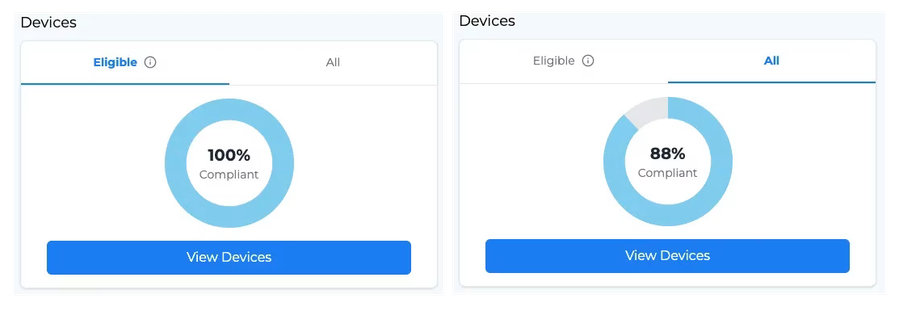
All Compliance
All Compliance is the raw, unfiltered figure. Every device or app in your estate is included in the calculation — no exceptions. It represents the true state of your entire fleet, warts and all.
This is useful when you want the full picture, but it can be misleading as a day-to-day benchmark. A device that hasn't checked in for three weeks, or a user who has exhausted their deferral allowance, can drag your average down in a way that doesn't reflect how well your patching setup is actually performing.
Eligible Compliance
Eligible Compliance is where the real insight lives. Rather than including everything, it filters out devices and apps that wouldn't reasonably be expected to be patched right now — removing noise so your figures more accurately reflect your actual patching effectiveness.
For a device to be considered eligible, all three of the following must be true:
- The device has checked in within the last 14 days
- The user hasn't deferred any pending updates on the device
- Updates are enabled on the device — including silent updates, update prompts, and per-app updates
For an app to be considered eligible, the same logic applies — but scoped to the device it's installed on:
- The app is installed on a device that has checked in within the last 14 days
- The user hasn't deferred updates for that specific app
- The app is installed on a device that has updates enabled
Worth noting: if Updates Allowed is set to false for a given application, it is excluded from both device-based and app-based compliance calculations entirely.
Why It Matters — A Real-World Example
Here's a concrete example of why this distinction is so valuable. Imagine your Eligible Device Compliance is sitting at 100%, but your All Compliance figure is only 88%. Without the Eligible view, that gap would be puzzling — and potentially alarming.
Drilling into the Devices list might reveal a Mac with a compliance score of just 7%. When you pull up that device's record, however, you find that the user has been deferring their update prompts — which means Zappl has correctly excluded it from Eligible Compliance. The low score is real, but it doesn't represent a failure in your patching setup. Zappl is doing its job; that device simply isn't eligible right now.
The same logic applies on the application side. An app installed on a device that hasn't checked in recently, or where the user has deferred that specific update, won't drag your Eligible Application Compliance down — because it shouldn't.
Putting It All Together
The combination of Device and Application compliance views, paired with the Eligible/All toggle, gives you a genuinely flexible way to monitor your patching health:
- Eligible Compliance is your day-to-day benchmark — it reflects how well your patching configuration is performing across the devices and apps that are actively being managed.
- All Compliance is there when you want the unfiltered picture, or when you're investigating why a specific device or app is pulling your figures down.
- Use the Applications view in the Portal to identify which specific apps are lagging estate-wide, and the Devices list to pinpoint machines that need attention.
The Portal's Alerts widget ties everything together, surfacing devices with compliance below 50%, those that haven't checked in for 7 or more days, machines with errors or warnings, low disk space, and more — so you're never left guessing about the health of your estate.